Find the material.
Browse photographs and graphics, search for a visual scene in video, or return to a phrase in a recording’s transcript. Preview the source to check it is right for the story.
 ArcticMAM
Help your team create
Bring photos, B-roll and finished recordings back into the creative process. Find what your team already has before starting from scratch.
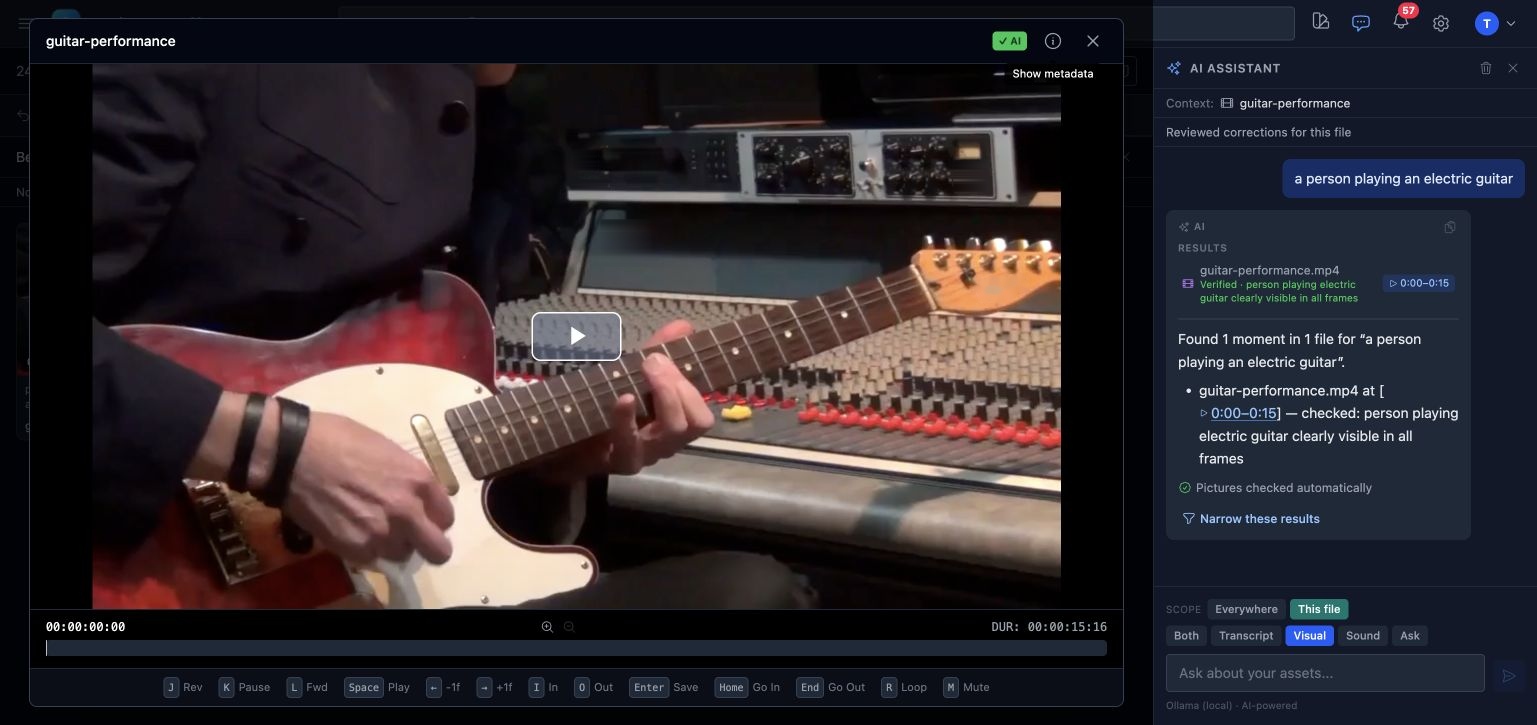
Browse photographs and graphics, search for a visual scene in video, or return to a phrase in a recording’s transcript. Preview the source to check it is right for the story.
Mark an in and out point and save a subclip. Bring selections together in a collection for a sermon excerpt, ministry recap or next week’s announcement.
Download media or export a timeline selection. Keep the original recording in the library while your editing team builds the next piece.
Find the image for a teaching slide, bulletin or ministry story.
Revisit a useful scene, worship moment or establishing shot.
Give a service, class or interview another life as an excerpt.
From selection to edit
Export a selection as an EDL, Final Cut Pro 7 XML or FCPXML timeline for your editing software.
Choose the format for your workflow and confirm media paths, import and relinking in your editor. End-to-end Premiere Pro and DaVinci Resolve import is not yet verified in this demonstration.
See a search, check the source and discuss your church’s setup.