ArcticMAM

Media management for worship teams

Find the moment you remember from Sunday.

Search your recordings by the words you remember—or what’s in the picture. Open the result, check the source, and put your media back to work.

Services. Sermons. Worship. Teaching.
One organized media library.

Visual searchWatch the source clip
The actual search

“a person playing an electric guitar”

Licensed demonstration footage · Not a customer recording

VideoAudioPhotosDocumentsBuilt around the people behind the service.

Two ways to find a moment

Search what you see.
Find what was said.

These are two separate examples, using different demonstration recordings.

Example 1 · Visual search

Find a guitarist in the picture.

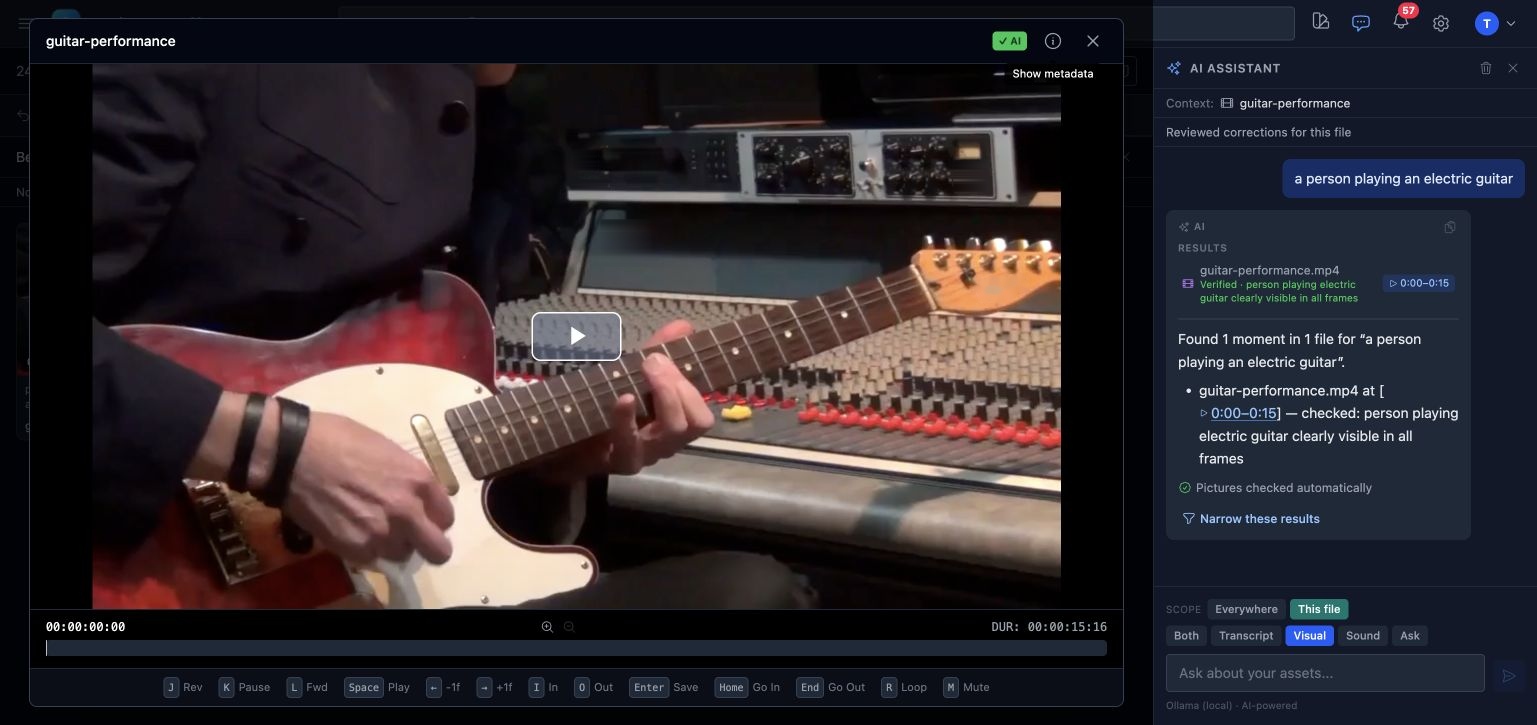
Search: “a person playing an electric guitar”

This result opens the matching guitar performance. Review the picture and play the source before using it.

Licensed guitar footage · Actual product screen
Transcript workflow illustration

Search the spoken words

Search a phrase. Select its timecode. Return to that moment in the recording.

Illustration of the workflow; not an application screenshot.

Example 2 · Transcript search

Go straight to the spoken words.

In a different practice recording, searching the transcript for “world” finds a matching line.

Selecting its timecode opens that spoken moment at six seconds. Use this workflow to revisit a phrase in a sermon, class or interview.

Speech practice recording · Workflow illustration

Actual captured screens, not live AI queries. Search results should be checked against the original recording.

About these examples

Captured from ArcticMAM on November 24, 2026 using licensed and owned practice media. Visual-result opening, transcript filtering and timecode seeking were tested. No customer recordings or named-speaker recognition are shown. The website does not run an AI query.

A library the next person can use

The archive belongs
in the workflow.

Give staff and volunteers a place to start when the familiar request arrives: “Can you find that recording?”

Start with what you remember.

Look for a spoken phrase or a visual scene. Follow the result back to the recording.

Keep the production connected.

Organize recordings, graphics, photographs and supporting files with folders, metadata and previews.

Make the handoff easier.

Give the next volunteer useful context alongside the media, rather than relying on someone’s memory of a folder.

Help your team create

Your next story
may already be here.

Bring photos, B-roll and finished recordings back into the creative process. Find what your team already has before starting from scratch.

Actual visual-search result opening a licensed guitar performance in ArcticMAM
Actual ArcticMAM screen · Licensed demonstration footage
01

Find the material.

Browse photographs and graphics, search for a visual scene in video, or return to a phrase in a recording’s transcript. Preview the source to check it is right for the story.

02

Keep the useful moment.

Mark an in and out point and save a subclip. Bring selections together in a collection for a sermon excerpt, ministry recap or next week’s announcement.

03

Prepare the editing handoff.

Download media or export a timeline selection. Keep the original recording in the library while your editing team builds the next piece.

Photos & graphics

Find the image for a teaching slide, bulletin or ministry story.

B-roll & performances

Revisit a useful scene, worship moment or establishing shot.

Finished recordings

Give a service, class or interview another life as an excerpt.

Explore the production workflow

The viewing portal

The message continues
beyond the room.

A straightforward viewing experience for the recordings your team chooses to share.

Explore the viewing portal

Keep learning between sessions

A place to return
to the teaching.

Let a class revisit selected teaching recordings and catch up before the next session.

Your staff chooses the published media and its public or invited-member audience. Staff manage invitations. This is media viewing, not a course or attendance system.

Before you take a closer look

A few practical questions.

What can we keep in the library?

Organize video, audio, photographs and documents together. Previews and processing depend on the file format and your system.

How does search help with a long recording?

Search the transcript for a phrase and follow its timecode into the recording. Visual search offers another way to look for a scene. The walkthrough shows actual examples you can inspect.

Can people watch selected teaching without using the staff library?

The viewing portal presents the media your team publishes for a public or invited-member audience. It is a separate viewing experience from managing the library.

Does ArcticMAM run at our church?

ArcticMAM can run on compatible on-premise hardware with customer-controlled storage. Review the formats, workload, access and backup responsibilities before rollout.

Talk about your church’s needs

What would you like to find in your archive?

See a search, check the source and discuss your church’s setup.

Request a demo

Product screenshot